How to Build a WiiM 5.1 Home Theater With the Speakers You Already Own
Build a real Dolby 5.1 WiiM system around passive speakers, powered speakers or an existing amplifier—and learn when you need WiiM Pro instead of WiiM Amp.
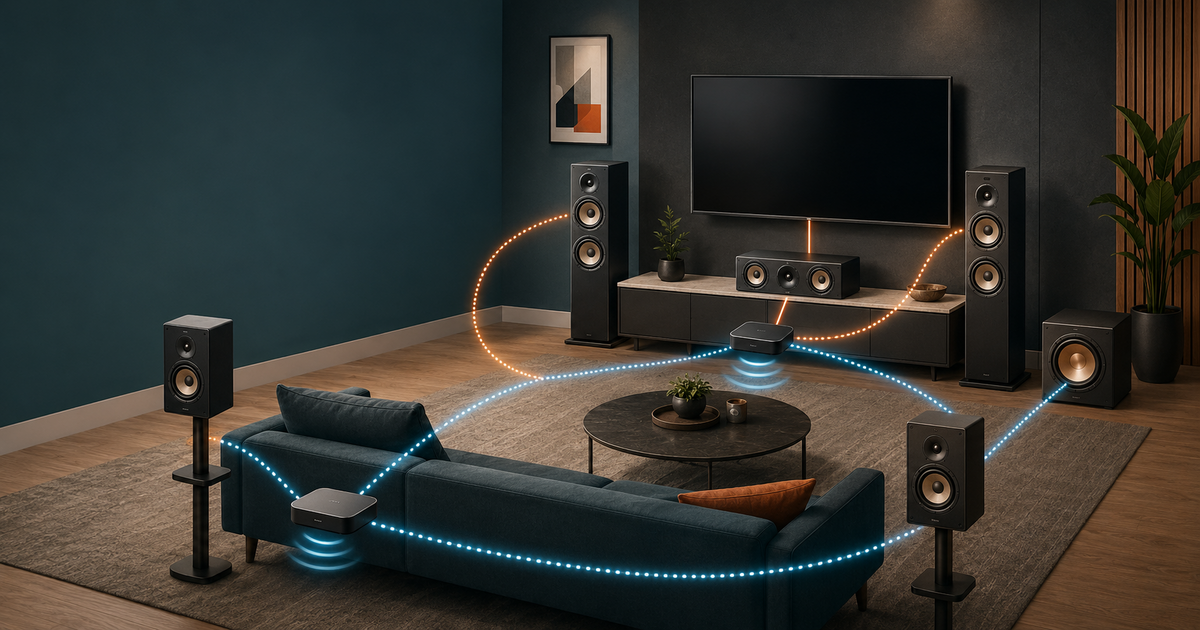
Evidence label: Verified system guide based on current WiiM support documentation and published device capabilities. It is not a simultaneous hands-on test of every configuration.
You do not need to replace every speaker to build a WiiM Dolby 5.1 system. The platform is modular: a compatible WiiM hub receives Dolby Digital from the television, reproduces the front-left and front-right channels, sends the LFE channel to a subwoofer, and distributes center and surround channels to other WiiM devices over the network.
That flexibility is useful—but only if each existing speaker is matched to the right WiiM device.
The most important rule is simple:
- Use a WiiM streaming amplifier when the connected speakers are passive and no separate amplifier is available.
- Use a WiiM streamer when the connected speakers are powered or an existing amplifier is already available.
In practical terms, that usually means WiiM Amp for passive speakers and WiiM Pro for powered speakers or an existing amplifier. The standard WiiM Amp and WiiM Pro can serve downstream channel roles, but neither should be confused with the Dolby-decoding hub.
Start with the correct WiiM hub
WiiM currently documents three devices as Dolby 5.1 hubs:
- WiiM Amp Ultra — drives passive front-left and front-right speakers directly.
- WiiM Amp Pro — also drives passive front speakers directly, with less published output power than Amp Ultra.
- WiiM Ultra — a streamer/preamplifier for powered front speakers or an existing power/integrated amplifier.
The hub connects to the TV through HDMI ARC/eARC or optical. HDMI ARC is normally preferable because the TV remote can control everyday volume. The television should be configured to output Auto, Dolby Digital or the equivalent Dolby Digital setting.
The ordinary WiiM Amp is not a Dolby 5.1 hub. It accepts stereo PCM for television use, but it can be assigned as a downstream center or surround device. The WiiM Pro is also a downstream streamer, not the main Dolby-decoding hub.
WiiM explicitly says that WiiM Mini and WiiM Vibelink Amp are not supported as devices in this Dolby 5.1 arrangement. Vibelink Amp may still amplify an analogue signal received from a compatible streamer, but it is not itself assigned as a WiiM home-theater channel device.
How the channels are divided
| Channel | What handles it | Speaker requirement |
|---|---|---|
| Front left and right | Amp Ultra, Amp Pro or Ultra hub | Passive speakers with an Amp hub; powered speakers or external amplifier with Ultra |
| Center | One compatible WiiM streamer, streaming amplifier, Sound or Sound Lite | Add a suitable amplifier when the center speaker is passive and the WiiM device has line-level output only |
| Surround left and right | One compatible WiiM streamer/streaming amplifier, or two WiiM Sound/Sound Lite speakers | One stereo WiiM device normally handles the surround pair |
| LFE/subwoofer | Subwoofer output of the hub, or compatible wireless WiiM Sub Pro | A powered subwoofer is required unless the system omits the .1 channel |
If no dedicated center is assigned, WiiM says the center channel is distributed between the front-left and front-right speakers. That produces a phantom center. It is a useful 4.1 starting point, but dialogue will be anchored less precisely for listeners sitting away from the middle.
WiiM Pro or WiiM Amp? Use this decision rule
The choice is determined by what sits after the WiiM device—not by whether the channel is called center or surround.
Choose WiiM Amp when:
- the speakers are passive;
- no suitable amplifier is already available;
- one box should receive the wireless channel signal and power a stereo speaker pair;
- you are adding passive surrounds with the least extra hardware.
For example, one WiiM Amp can receive the surround-left and surround-right channels and drive a pair of passive rear speakers. Two WiiM Amps are not required for a conventional passive surround pair.
Choose WiiM Pro when:
- the speakers are powered/active;
- an integrated amplifier, stereo power amplifier or two mono amplifiers already exist;
- you want analogue or digital line-level output rather than speaker-level power;
- preserving an existing amplifier is more economical than replacing it.
One WiiM Pro provides stereo output, so it can normally feed both surround channels to a stereo amplifier or a pair of powered speakers. Buying two WiiM Pro units for the rear pair is usually unnecessary. Use separate streamers only when the exact channel assignment and downstream mono-amplifier layout require it and the current WiiM Home app presents that supported assignment.
For surround duty, the standard Pro is generally the rational choice over Pro Plus because channel routing and system compatibility matter more than paying for the Pro Plus's upgraded internal analogue stage. Pro Plus can still be used if you already own it or want its better analogue output in a revealing external-amplifier chain.
Scenario 1: You already own a complete passive 5.1 speaker package
This is the most common retrofit: five passive speakers and a powered subwoofer remain from an older AV receiver.
Recommended architecture
- Front L/R: WiiM Amp Ultra or Amp Pro → existing passive front pair
- Center: WiiM Pro → mono power amplifier → existing passive center
- Surround L/R: WiiM Amp → existing passive surround pair
- Subwoofer: hub sub output → existing powered subwoofer
The extra mono amplifier for the center is the awkward part. A conventional center speaker is usually passive, while WiiM Pro only supplies line-level output. Do not connect a passive center directly to a Pro.
A lower-cost first stage is 4.1:
- Amp Ultra/Amp Pro drives the front pair.
- WiiM Amp drives the surround pair.
- The powered sub connects to the hub.
- The front pair reproduces a phantom center.
Add the dedicated center device and amplifier only if dialogue localization or off-axis seating justifies the cost and complexity.
What not to reuse
An old AV receiver can sometimes be retained as an amplifier only if it offers a suitable multichannel or direct input arrangement and its volume/gain behavior can be controlled safely. Do not assume that sending a stereo signal into an ordinary receiver input will independently power the correct center and surround channels.
Scenario 2: Your front, center or surround speakers are powered
Powered speakers already contain amplification, so a second power amplifier is unnecessary.
All-powered layout
- Front L/R: WiiM Ultra → powered front pair
- Center: WiiM Pro → powered center or appropriate powered-speaker arrangement
- Surround L/R: one WiiM Pro → powered surround pair
- Subwoofer: WiiM Ultra sub output → powered subwoofer
This is where WiiM Pro is clearly more appropriate than WiiM Amp. Using an Amp would add speaker-level amplification that powered speakers do not need and may not accept.
Check the input topology carefully. A stereo powered pair may accept both left and right inputs on one primary speaker, while studio monitors usually have one input per speaker. The wiring must preserve left/right channel assignment, and every speaker should be placed in a fixed-volume or predictable gain configuration before calibration.
Do not connect WiiM Amp speaker outputs to a powered speaker's RCA, XLR or 3.5mm input.
Scenario 3: You already own power amplifiers or an integrated amplifier
An existing amplifier often makes WiiM Ultra and WiiM Pro the most economical route.
Recommended architecture: separate-amplifier setup
- Front L/R: WiiM Ultra → existing stereo power or integrated amplifier → passive fronts
- Center: WiiM Pro → existing mono/stereo amplifier channel → passive center
- Surround L/R: one WiiM Pro → existing stereo amplifier → passive surrounds
- Subwoofer: WiiM Ultra sub output → powered subwoofer
Use a power-amp input, home-theater bypass or another input with a stable, documented gain arrangement where possible. If an integrated amplifier's normal volume control remains active, mark a repeatable reference position and prevent accidental changes. Two independent volume controls in the signal path can make calibration unreliable and may create dangerous level jumps.
If the existing front amplifier is the best part of the system, WiiM Ultra is usually preferable to replacing it with Amp Ultra. If simplicity is more important than retaining the amplifier, Amp Ultra reduces the front chain to one box.
Scenario 4: You already own some WiiM devices
Start by classifying each device by role.
| Device already owned | Best 5.1 use |
|---|---|
| WiiM Amp Ultra | Hub for passive front speakers |
| WiiM Amp Pro | Hub for passive front speakers |
| WiiM Ultra | Hub for powered fronts or an existing front amplifier |
| WiiM Amp | Downstream device for passive surround pair; potentially another supported channel role |
| WiiM Pro / Pro Plus | Downstream line-level device for powered speakers or an existing amplifier |
| WiiM Sound / Sound Lite | Individual center or surround speaker |
| WiiM Mini | Not supported in the documented Dolby 5.1 setup |
| Vibelink Amp | Not an assignable WiiM 5.1 device; can only sit after a compatible line-level streamer where appropriate |
If you own Amp Ultra plus two WiiM Pro units, do not automatically assign both Pros to the rear pair. First check whether one Pro can feed both rear speakers or the existing rear amplifier. The second Pro may be more useful for the center channel.
If you own only a standard WiiM Amp, it cannot become the Dolby hub through grouping alone. Add Amp Ultra, Amp Pro or Ultra as the hub, then reuse the Amp downstream.
Scenario 5: You want to mix old passive speakers, powered speakers and different amplifiers
A mixed system is valid because the WiiM platform distributes channels by role. The speakers do not need to share a brand or amplifier type.
Example:
- Amp Ultra drives old passive front towers.
- WiiM Pro feeds a powered center speaker or a mono amplifier and passive center.
- Another WiiM Pro feeds powered studio monitors as surrounds.
- The existing powered subwoofer connects to the hub.
The main challenge is not network grouping; it is level, voicing and latency consistency.
- Match channel levels in the WiiM Home app.
- Keep powered-speaker gain controls fixed.
- Confirm speaker polarity.
- Use the same network, preferably with strong Wi-Fi or wired Ethernet where available.
- If lip-sync is wrong, adjust the hub's Group Audio Delay for the TV input. WiiM states that a lower value improves A/V synchronization.
- Recheck dialogue and surround balance from more than one seat.
Very different speakers can still work, but a radically brighter center or slower, bass-heavy surround pair may make pans and dialogue sound inconsistent. Reusing equipment saves money; it does not guarantee tonal matching.
Scenario 6: You are building from zero
There are three sensible starting points.
Lowest-complexity expandable system: 2.1 → 4.1 → 5.1
- Buy Amp Ultra or Amp Pro, a passive front pair and a powered subwoofer.
- Add one WiiM Amp and a passive surround pair.
- Add a center-channel WiiM device and suitable speaker/amplification only if the phantom center is insufficient.
This staged path avoids buying every box before you know whether the room benefits from a dedicated center.
All-WiiM active-speaker path
- Amp Ultra, Amp Pro or Ultra as the hub
- WiiM Sound/Sound Lite units assigned as center and surrounds
- wired powered subwoofer or WiiM Sub Pro
This reduces analogue cabling and amplifier matching. It also places more of the system inside one manufacturer's software ecosystem.
Traditional-speaker path
- Amp Ultra for passive front speakers
- WiiM Amp for passive surrounds
- WiiM Pro plus a mono amplifier for passive center
- powered subwoofer
This costs more boxes than an AV receiver, but it lets owners choose conventional speakers and retain WiiM's music-streaming interface. Compare the total system cost and cable count against a normal AVR before committing.
Setup procedure in the WiiM Home app
- Update every WiiM device and the WiiM Home app before grouping.
- Connect the compatible hub to the TV by HDMI ARC/eARC; use optical only when ARC is unavailable or unreliable.
- Set the TV audio output to Auto, Dolby Digital or the equivalent supported option.
- Connect the powered subwoofer to the hub's sub output, or pair WiiM Sub Pro through the app.
- Put all WiiM devices on the same network.
- Open Devices, select the hub, and open Device Settings.
- In Home Theater, select Center and assign the center device if used.
- Select Surrounds and assign the surround device or compatible speakers.
- Play known Dolby Digital 5.1 content and confirm every channel.
- Adjust channel levels, crossover, room correction and Group Audio Delay only after the routing is correct.
Do not test with ordinary stereo content and conclude that the system is malfunctioning. A true 5.1 channel check requires a Dolby Digital 5.1 source and correct TV output configuration.
Important limitations before you buy
- This is a networked, multi-device Dolby 5.1 system, not a conventional AVR with six wired power-amplifier channels in one chassis.
- The hub is limited to documented compatible models; grouping an older WiiM device does not turn it into a Dolby decoder.
- WiiM Mini and Vibelink Amp are excluded from the official 5.1 device list.
- A streamer cannot drive a passive speaker without an amplifier.
- A streaming amplifier should not feed the line input of a powered speaker.
- Different device paths can require delay and level adjustment.
- Firmware and WiiM Home app behavior can change. Verify the current Center and Surround assignment options before the seller's return period ends.
- Dolby Digital 5.1 support should not be described as support for every Dolby or DTS format. Confirm the source format and TV passthrough behavior.
Final recommendation
For most owners with a passive speaker package, the best-value first build is Amp Ultra or Amp Pro at the front, one WiiM Amp for the passive surround pair, the existing powered subwoofer, and a phantom center. Add a dedicated center path later if dialogue needs improvement.
For powered speakers or systems with existing amplifiers, use WiiM Ultra as the hub and WiiM Pro units as line-level channel interfaces. This preserves the equipment you already own and avoids paying for unnecessary amplification.
The decisive question is not “WiiM Pro or WiiM Amp?” It is:
Does this speaker already have amplification?
If yes, use a streamer. If no, use a streaming amplifier or add an external amplifier. Once that rule is applied separately to the front, center and surround channels, the correct WiiM architecture becomes much easier to see.
Evidence, limitations and disclosure
Evidence basis: WiiM's current official Dolby 5.1 setup guide, center/surround setup instructions, product documentation and SoundPath Lab's verified WiiM product records. Device compatibility and channel roles are treated as verified facts; architecture and buying recommendations are editorial system-design judgments.
Hands-on status: SoundPath Lab has not simultaneously assembled and measured every architecture in this guide. No claim is made that mixed speaker systems will have identical voicing, latency or output capability.
Firmware and versions reviewed: Public WiiM documentation available on August 29, 2026. The official 5.1 guide was modified July 17, 2026, and the WiiM Sound/Sound Lite center-and-surround guide was modified July 20, 2026.
Commercial disclosure: No manufacturer or retailer reviewed or approved this guide. Seller availability and commercial relationships have zero weight in the recommended architecture. See the Disclosure & Funding policy.
Official setup information
- WiiM: Setting Up a Dolby 5.1 Home Theater
- WiiM: Add Surround Speakers
- WiiM: Add a Center Speaker
- WiiM Sound and Sound Lite as Center and Surround Speakers
Product and buying options
- WiiM Amp Ultra product profile · EMiUZEK (Listing unavailable)
- WiiM Amp Pro product profile · EMiUZEK (Listing unavailable)
- WiiM Ultra explained · EMiUZEK (Listing unavailable)
- WiiM Pro product profile · EMiUZEK (Listing unavailable)
- WiiM Amp at EMiUZEK (Listing unavailable)
- WiiM product information and authorized sellers
Seller order follows reader region, authorization status, warranty clarity, returns and availability—not commission. Prices, stock, plug type and regional warranty can change.
Related reading
- Powered vs Passive Speakers
- TV + Music Stereo: Three Clean Architectures
- WiiM Bar 5.1.2 Ecosystem Explained
- WiiM Brand Profile
- System Builder
Compare the hub amplifiers before buying
The hub choice is not a simple good-better-best ladder. The original WiiM Amp receives AirPlay but is not the documented Dolby 5.1 hub; Amp Pro supports the 5.1 hub role at the same published 60 W/channel; Amp Ultra adds higher published power and a display. See WiiM Amp vs Amp Pro vs Amp Ultra for the complete AirPlay, Dolby and keep-or-upgrade decision.
Comparison record last checked: September 12, 2026.
Reassessment — October 3, 2026: format gate, LFE and firmware risk
The architecture in this guide remains valid, but three operational boundaries deserve a more explicit owner check.
1. A 5.1 label is not enough: verify the input format
Primary-source Verified: WiiM's current home-theater guide identifies WiiM Amp Pro, WiiM Amp Ultra and WiiM Ultra as the supported hub devices. The hub receives TV audio through HDMI ARC/eARC or optical, and every WiiM device assigned to the system must be on the same Wi-Fi network. WiiM instructs owners to set the TV output to Auto, Dolby Digital Audio or the equivalent setting and to use Dolby Digital 5.1 content for a 5.1-channel check.
For WiiM Amp Ultra specifically, the current user manual states that HDMI ARC and optical accept stereo PCM and Dolby Digital 5.1 but not DTS. A file, console or streaming service displaying “5.1” does not establish that the TV is actually delivering a supported Dolby Digital stream to the hub.
Owner responsibility: confirm the source format, the TV output setting and the hub input before changing speakers, crossover or delay. Do not diagnose a networked speaker failure from ordinary stereo content or from an unsupported format.
2. A single WiiM device does not reproduce the dedicated LFE channel
Primary-source Verified: WiiM's support note says that a single WiiM device downmixes Dolby 5.1 to two-channel stereo. The five main channels are included in that downmix, but the dedicated LFE channel is excluded. A connected subwoofer can still receive bass extracted from the stereo mix; that is not the same signal as the “.1” effects channel.
WiiM says a multi-device home-theater group is required for full-channel playback with LFE routed to the subwoofer. This distinction explains why a one-box TV system may produce some bass yet still sound light during effects-heavy scenes.
Editorial Inference: owners should treat “subwoofer makes sound” and “the LFE channel is present” as two separate checks. The first can be true in a stereo downmix while the second is false.
3. Dolby behavior has changed through firmware
WiiM's Amp Ultra release history documents several Dolby-related corrections. These are Brand Response claims, not SoundPath Lab retest results.
| Date | Firmware | Brand Response | What an owner should conclude |
|---|---|---|---|
| August 18, 2025 | 5.2.726631 | WiiM said it fixed Dolby multi-room no-sound cases, volume-balance behavior and low Dolby Digital volume. | Earlier firmware is not an adequate reference point for current behavior. |
| September 26, 2025 | 5.2.730559 | WiiM said it removed Dolby playback noise and corrected subwoofer no-sound cases. | A successful update should be followed by the same channel and subwoofer checks; the changelog alone does not prove the local system is fixed. |
| April 9, 2026 | 5.2.813343 | WiiM listed simplified surround setup, an Apple TV low-bass correction and EQ for Dolby 5.1. | Source device, hub firmware and app version can all change the observed result. |
| September 17, 2026 | 5.2.829663, staged rollout | The current listed release adds other features and network fixes but no new 5.1-specific correction. | “Latest firmware” is a version fact, not proof that every older Dolby symptom is absent in every topology. |
No firmware row above is labelled SoundPath Lab Tested. SoundPath Lab has not reproduced the listed faults and fixes across a controlled 5.1 matrix.
Owner acceptance test before the return window closes
Run this after initial setup and after any material hub, app, TV or network change.
- Record versions and topology. Save the hub firmware, center/surround firmware, WiiM Home app version, TV model and TV audio-output setting.
- Prove the input. Use known Dolby Digital 5.1 material. Confirm that the TV is not forcing PCM stereo and that the source is not DTS or another unsupported format.
- Prove channel identity. Check front left, front right, center, surround left and surround right separately. If no center device is assigned, record that the system is intentionally using WiiM's phantom-center behavior.
- Separate bass from LFE. In a complete multi-device group, confirm that a dedicated LFE test reaches the subwoofer. With a single WiiM device, do not log the missing dedicated LFE channel as a defect; WiiM documents that downmix behavior.
- Set delay after routing. Correct channel assignment first. If picture and sound then disagree, adjust Group Audio Delay for the TV input; WiiM says a lower value improves A/V synchronization.
- Check owner-risk states. Test TV-remote volume, mute, standby, wake, input return and one full restart at a safe volume. Recheck center dialogue, surround balance and subwoofer output after the restart.
- Keep evidence scoped. A pass or failure belongs to that exact hardware, firmware, app, TV, network and source chain. It is useful Owner Evidence only when those conditions are recorded; it is not proof about every WiiM 5.1 system.
Evidence status for this reassessment
- SoundPath Lab Tested: No complete WiiM 5.1 chain was assembled or measured for this revision.
- Primary-source Verified: supported hub models, channel roles, system configurations, TV connection, same-network requirement, Dolby Digital setup, Amp Ultra PCM/Dolby/DTS boundary and single-device LFE behavior.
- Owner Evidence: none used for the published conclusions.
- Brand Response: WiiM's dated firmware-fix statements.
- Community Report: none used.
- Editorial Inference: the staged buying logic, separation of bass from LFE, and the acceptance-test sequence.
- Unknown: long-term reliability across device mixtures, network conditions and firmware/app combinations; exact incidence of historical faults; room-to-room latency and voicing consistency without controlled testing.
Official sources checked October 3, 2026:
- WiiM: Setting Up a Dolby 5.1 Home Theater with WiiM Devices
- WiiM: Why LFE Is Missing During Dolby 5.1 Playback on a Single Device
- WiiM Amp Ultra User Manual v1.0.5
- WiiM Amp Ultra Firmware Release Notes
Continue the research
Move from this article to a verified product decision
Use descriptive links to move between product records, brand evidence, comparisons, setup or issue guidance, and compatible-system tools. Inclusion reflects subject relevance, not a score or endorsement; product facts, recommendation eligibility, and commercial links remain separate.
Product page
Verify the exact model
Brand center
Check the wider platform
Related comparison
Compare the system role
Setup, firmware & problems
Check behavior before buying
System Builder & compatibility