
FiiO K11 R2R Windows Setup: Driver, SAM, IDLE and Output Modes
Set up the K11 R2R on Windows, choose UAC mode, understand SAM and IDLE, and keep one safe volume control.
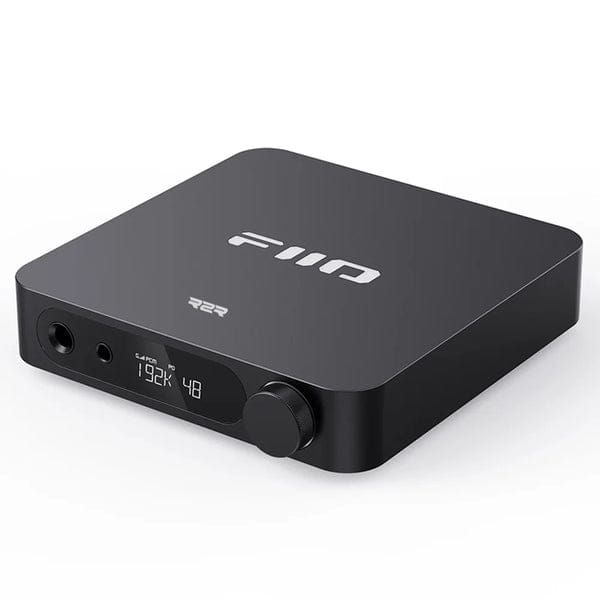
Set up the K11 R2R on Windows, choose the right USB mode, understand SAM and IDLE, and keep one safe volume control.
Evidence status: This is a primary-source-verified setup guide based on FiiO's current support documentation. SoundPath Lab has not tested this exact DAC, Windows installation, wake behaviour or every downstream amplifier. Where FiiO's pages use inconsistent output-mode names, the inconsistency is left visible rather than resolved by assumption.
Direct answer
For normal Windows use, install FiiO's current USB DAC driver,
connect the K11 R2R with a data-capable USB cable, select
USB as the input and choose the K11 as the output in
Windows and in the playback app.
Leave SAM on its default OS setting if the
immediate goal is simply to confirm stable operation. NOS
turns oversampling off; OS turns it on. This is not the
same control as the digital-filter menu on the standard K11.
Leave IDLE off during initial setup. Once the complete
system is stable, enable it only if the 30-minute partial power-down
behaviour is useful and wake-up operation is acceptable in the exact
system.
For headphones, begin with low gain and the volume near minimum. For rear outputs, decide first which device owns volume. A fixed line output requires volume control downstream. A variable/preamp output can control a power amplifier or powered speakers only after a low-level commissioning check.
Before connecting anything
Prepare four things:
- a USB cable that carries data, not a charge-only cable;
- the K11 R2R power supply specified for the unit;
- the official FiiO Windows USB DAC driver page;
- a decision about whether the first test will use headphones, a conventional amplifier line input or powered speakers.
Turn the downstream amplifier or powered speakers down before changing output mode. Disconnect headphones if the rear output is being commissioned for the first time. Do not begin with a power amplifier already at operating level.
Windows installation sequence
- Download the current FiiO USB DAC driver from FiiO's K11 support centre or Windows driver page.
- Run the installer and follow its current prompts. Restart Windows if the installer requests it.
- Connect the K11 R2R to a USB data port on the computer.
- Power on the K11 R2R and select
USBas the input. - In Windows sound settings, select the K11 as the output device.
- In a music player that has its own output selector, choose the same device there.
- Begin with Windows enhancements, spatial effects and player DSP disabled. Add processing only after basic playback is stable.
- Test with a familiar PCM track before changing
SAM, gain or output mode.
FiiO documents macOS as driverless. It says Linux is theoretically driverless but cannot guarantee compatibility across every version. This article is therefore a Windows setup guide, not a universal computer-compatibility promise.
UAC 2.0 first; UAC 1.0 as a compatibility path
FiiO documents both USB Audio Class 1.0 and 2.0 modes for the K11 family.
Use UAC 2.0 as the normal Windows path when the FiiO driver is installed and the computer, player and required formats work correctly. Try UAC 1.0 only when a host or application specifically needs the older class mode.
That preference is an Editorial Recommendation, not a claim that UAC 2.0 sounds better. UAC mode changes host compatibility and available transport capability; it is not a tone control.
If a Windows update produces a new no-audio condition, record the Windows build, driver version, UAC mode, input, output mode and whether the K11 appears in Device Manager before changing several settings at once. SoundPath Lab's separate Windows USB Audio Class 1.0 issue page covers the operating-system incident; it does not prove that every K11 R2R is affected.
SAM is the R2R oversampling control, not a filter menu
The standard K11 and K11 R2R do not have identical menus. FiiO's
comparison states that the K11 R2R removes the ordinary K11's filter
option and adds SAM plus IDLE.
On the K11 R2R:
SAM: OSmeans oversampling is on. FiiO documents this as the default and says incoming audio is internally upsampled to 384 kHz while the display continues to show the original sample rate.SAM: NOSmeans oversampling is off.
Do not look for the standard K11's FILT menu on the R2R
model. Do not describe NOS as inherently more accurate, more analogue or
better sounding. Those are listening and preference claims that this
guide does not test.
A clean setup sequence is to confirm playback with the default
OS setting, then compare NOS and OS at matched volume using
the same track. If no repeatable difference matters in the actual
system, retain the setting that is easiest to document and
reproduce.
What IDLE does
FiiO documents IDLE as off by default. When enabled and
no playback occurs for 30 minutes, part of the circuit powers down and
the RGB lighting turns off; playback wakes the unit.
Enable it for reduced idle activity only after ordinary playback, pause/resume and device discovery are stable. If the first moment of playback is missing, wake-up is inconsistent or an application loses the device, turn IDLE off and repeat the same test before treating the behaviour as a fault.
That troubleshooting step is an Editorial Inference. It does not establish that IDLE causes a known defect, and the prevalence of any wake-related problem remains Unknown without controlled testing or a verified owner cohort.
Choose the output before setting volume
Headphones
Use the front headphone output, start on low gain and raise volume slowly. FiiO documents low, medium and high gain stages for the K11 family. Gain is not a quality setting; it changes the usable level range.
Move to a higher gain only when the required listening level cannot be reached with useful headroom. High gain is not automatically appropriate for a balanced plug or a difficult-looking specification.
Fixed line output into an integrated amplifier
Use a documented fixed line-output mode only when the receiving amplifier has a normal line input and will remain the master volume control. Begin with the amplifier low. Never feed a line output into a phono input.
This arrangement avoids two everyday volume controls. It also means Windows or the K11 must not be assumed to provide an emergency attenuation path if the selected output is genuinely fixed.
Variable output into powered speakers or a power amplifier
Use a variable/preamp mode only when the rear output is documented as adjustable and the downstream device is intended to receive it. Begin near minimum, enable any appropriate volume limit, then test mute, source switching, standby and restart before normal listening.
FiiO's current operation page contains a naming inconsistency: its
quick-switch description calls the adjustable rear mode
LO SE, while the settings table labels the K11 R2R
selection PRE. Check the exact label shown by the unit and
its current manual or firmware before assuming the two names are
interchangeable.
This documentation conflict is Unknown, not permission to guess. The safe rule is functional: verify that the selected rear mode is adjustable before connecting directly to a power amplifier or powered speakers.
Digital input and output limits that matter
FiiO documents USB, optical and coaxial inputs. It also states that coaxial output is available in USB input mode; optical or coaxial input mode does not simultaneously provide coaxial output.
That makes the K11 R2R useful as a USB-to-coaxial bridge in the documented USB path, but not as a universal digital-input pass-through. Confirm the receiving DAC's accepted sample rates and formats separately.
Connector availability is Primary-source Verified. Stable operation with a particular computer, cable, driver and downstream DAC remains Unknown until tested in that chain.
Ten-minute commissioning check
Before treating the setup as complete:
- Play a familiar PCM file for two minutes.
- Pause and resume three times.
- Switch to another application and back.
- Confirm that Windows and the player still address the intended output.
- Test
SAM: OS, thenSAM: NOS, without changing gain or output mode. - Return to the preferred SAM setting and write it down.
- If IDLE will be used, leave the unit silent for more than 30 minutes and test the first playback after wake.
- Restart the K11 R2R and confirm input, output, gain and volume state.
- Restart Windows and confirm device discovery.
- Record the working driver, Windows build and UAC mode.
These are Editorial Recommendations. Completing them does not convert the article into SoundPath Lab Tested evidence.
Community reports are leads, not defect findings
Individual users have reported pops, driver trouble and other USB-audio symptoms around desktop DACs, including K11-family discussions. Such posts can suggest test conditions, but they do not establish prevalence, root cause or a model-wide fault.
No community complaint is used here as proof. A repeatable report would need the exact K11 variant, serial range where relevant, Windows build, FiiO driver, UAC mode, input, output, sample-rate transition, application and downstream chain before it could enter an Issue record.
Final recommendation
Set up the K11 R2R in the simplest state first: official Windows
driver, USB input, UAC 2.0, SAM: OS,
IDLE: OFF, low gain and one clearly assigned volume
control.
Then change one setting at a time:
- use UAC 1.0 only for a defined compatibility need;
- compare NOS and OS without turning the result into a universal sound claim;
- enable IDLE only after wake behaviour is acceptable;
- connect rear variable output directly to amplification only after verifying the exact mode and commissioning it at low level.
The important distinction is not “best mode.” It is whether the computer, DAC and downstream amplifier have one reproducible configuration and one unambiguous master volume.
Evidence, limits and disclosure
SoundPath Lab Tested: no.
Primary-source Verified: driver availability,
documented inputs and outputs, UAC modes, gain options, the removal of
FILT on K11 R2R, SAM NOS/OS behaviour, IDLE
behaviour and the published USB/coaxial routing limit.
Owner Evidence: none used.
Brand Response: none; FiiO's public support pages are treated as primary manufacturer documentation, not as a response to a SoundPath Lab case.
Community Report: mentioned only as a source of possible test conditions, not as proof of a defect.
Editorial Inference: the initial settings order, single-master-volume rule and controlled troubleshooting sequence.
Unknown: prevalence and cause of reported pops or
driver problems; behaviour across every Windows build, USB controller
and player; whether LO SE and PRE are only
naming differences across current documentation/firmware; long-term
firmware and repair support.
Sources
- FiiO K11 support centre — current driver, operation, connection and firmware links.
- FiiO Windows driver page — official Windows USB DAC driver route.
- FiiO operation guide — input switching, UAC modes, SAM, IDLE and output-menu descriptions.
- FiiO K11 vs K11 R2R differences — model-specific menu and conversion differences.
- FiiO input/output guide — documented connector roles, gain and coaxial-output routing.
- FiiO computer-use guide — Windows, macOS and Linux setup boundaries.
- FiiO K11 R2R firmware page — current public firmware status checked 23 September 2026.
Last checked: 23 September 2026. Recheck FiiO's support centre and the exact device firmware before changing UAC or output mode.
Continue the decision
- FiiO K11 R2R Product Profile
- Windows 11 September 2026 USB Audio Class 1.0 issue
- Fixed or Variable Line Output? How to Set Volume Safely
- Browse the Firmware & App Update Tracker
Continue the research
Move from this article to a verified product decision
Use descriptive links to move between product records, brand evidence, comparisons, setup or issue guidance, and compatible-system tools. Inclusion reflects subject relevance, not a score or endorsement; product facts, recommendation eligibility, and commercial links remain separate.
Product page
Verify the exact model
Brand center
Check the wider platform
Related comparison
Compare the system role
Setup, firmware & problems
Check behavior before buying
System Builder & compatibility