External Master Clocks and IIS Audio: What Can Actually Improve—and What Can Break
A measurement-led guide to 10/25 MHz master clocks and IIS over HDMI: when they can help, how compatibility fails, and how to test a real benefit.

External clocks and IIS connections are two of the most persuasive upgrades in digital audio because both appear to attack the same enemy: timing error. They are also two of the easiest purchases to get wrong.
The useful question is not whether a clock has lower phase noise on its own, or whether IIS separates clock and data. It is whether the complete transport, interface, DAC receiver and conversion stage produce a cleaner analog output—and whether the connection remains reliable with real music.
The Eversolo T10 makes this discussion timely. It provides isolated USB and IIS outputs, eight IIS output modes, an OCXO audio-clock system with PLL, and an external reference input accepting 10 MHz or 25 MHz at 50Ω or 75Ω. Those specifications create useful options. They do not prove that adding a clock or choosing IIS will improve every DAC.
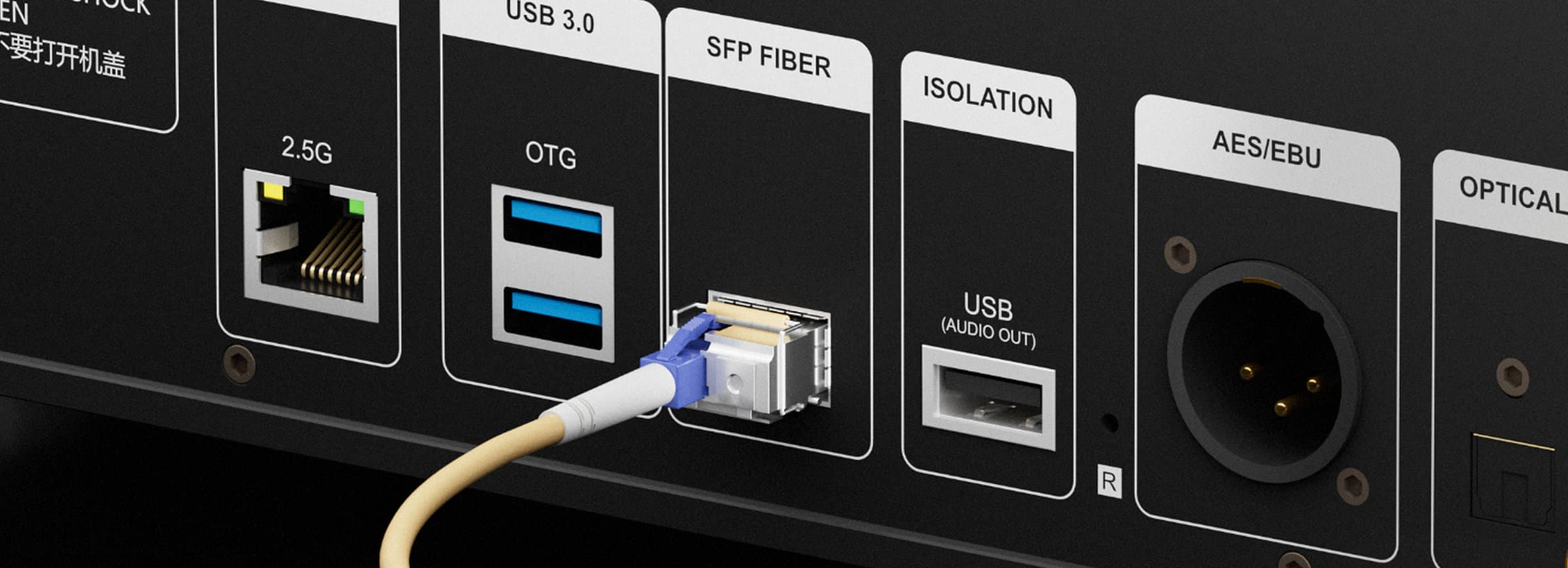
Eversolo T10 interface illustration. Official manufacturer image.
First distinction: the 10 MHz clock is not the audio signal
A 10 MHz or 25 MHz reference gives compatible equipment a timing reference. The device still has to synthesize the audio sample clocks required for 44.1 kHz and 48 kHz families and their multiples. A PLL, divider and local oscillator remain part of the path.
This means a superb laboratory specification for the external clock does not guarantee a better clock at the DAC chip. Results depend on:
- phase noise at the offsets that matter;
- the transport's reference input and PLL behavior;
- impedance matching and termination;
- cable loss and reflections;
- whether the DAC is actually synchronized to the same reference;
- the DAC's own clock recovery, buffering and rejection;
- electrical noise introduced by the extra component and connection.
An external clock can improve a system, make no measurable difference, or make it worse.
When an external clock has a credible use case
Synchronizing several devices
The clearest technical purpose is coordination. In a system where transport, DAC, digital processor or recorder must operate from a shared timing reference, a correctly designed clock-distribution system can prevent drift and keep devices synchronized.
Replacing a weaker reference stage
If measurements show that a device's internal reference or clock synthesis contributes jitter-correlated artifacts, a lower-noise external reference may improve the final result. The improvement must survive the receiving PLL and appear at the DAC's analog output, not only at the clock generator's BNC socket.
Controlled experimentation
The T10's selectable 10/25 MHz and 50/75Ω support makes it a useful platform for careful comparison. That is a reason to buy flexibility, not permission to assume success.
When the clock is unlikely to earn its cost
With a well-designed asynchronous USB DAC, the DAC normally schedules data flow and converts audio using its own local clock. Unless the transport's external reference changes a relevant noise or timing path, the DAC may show no change.
Likewise, a DAC with strong input jitter rejection may produce the same analog performance from several competent transports. In that situation the external clock is optimizing a number upstream that the DAC already prevents from becoming an audio error.
If the clock costs more than room correction, speaker placement work or subwoofer integration—and none of those basics has been addressed—the clock is rarely the rational first upgrade.
How to test whether a master clock helps
Use the same transport, DAC, output level, filter, cable routing, sample rate and warm-up state. Change only the clock condition.
Minimum bench protocol
- Verify that the transport reports a stable external lock. A connected BNC cable is not proof of lock.
- Confirm reference frequency and impedance at both ends: 10 MHz versus 25 MHz, and 50Ω versus 75Ω.
- Measure the DAC's analog output, not just the reference-clock output.
- Run a high-level sine test for THD+N and noise.
- Run a jitter-sensitive test signal and inspect the FFT for symmetrical sidebands or changes around the fundamental.
- Repeat internal-clock and external-clock conditions several times in alternating order.
- Record lock failures, pops, mutes and sample-rate transition behavior.
- If differences remain, perform level-matched blinded listening. Do not use sighted switching as the only evidence.
A result is meaningful when it is larger than run-to-run variation, repeats after reconnecting and does not trade lower jitter artifacts for higher noise or unreliable locking.
IIS over HDMI: connector compatibility is not protocol compatibility
IIS was designed as an inter-IC bus. High-end audio manufacturers often carry related signals through an HDMI connector, but this is not standard HDMI audio and does not provide HDMI-style negotiation.
Two sockets can look identical and still disagree about:
- data, bit-clock and left/right-clock pin assignments;
- master-clock presence;
- clock polarity;
- left/right channel assignment;
- DSD-on pin and polarity;
- mute signaling;
- supported PCM and DSD rates.
Eversolo publishes eight selectable IIS modes for the T10. This is helpful because it can match several common layouts. It is not universal compatibility.
A purchase-time IIS checklist
Before buying the T10 for a specific DAC, obtain the DAC's IIS pinout diagram and answer all of these:
| Check | Why it matters |
|---|---|
| Exact Eversolo mode known to work | Avoids trial-and-error with undocumented wiring. |
| PCM rates verified | “IIS supported” may not include the rate you intend to use. |
| Native DSD verified | DSD flag and polarity commonly cause silence or noise. |
| Left/right channels correct | A pinout can play while channels are swapped. |
| MCLK requirement | Some receivers require it; others reconstruct or omit it. |
| Cable length and construction | IIS was not originally intended as a long external interconnect. |
| Safe fallback available | USB or AES should remain available if IIS proves unstable. |
Start at 44.1 kHz PCM with the amplifier muted or at a very low safe level. Then verify 48 kHz, high-rate PCM and DSD one by one. Sudden full-scale noise from a format mismatch can damage speakers or hearing.
Is IIS better than USB, AES or coaxial?
Not categorically.
- USB is often the most practical high-rate connection and lets an asynchronous DAC use its local clock architecture.
- IIS exposes separate clock and data signals and may perform well with a carefully matched receiver, but compatibility risk is highest.
- AES/EBU is robust and balanced, especially useful over longer runs between properly implemented devices.
- Coaxial S/PDIF is widely compatible and can perform transparently with a good receiver.
- Optical breaks the electrical ground connection, though transmitter/receiver quality and rate limits vary.
The best interface is the one that the two specific products implement best, not the one with the most audiophile vocabulary.
A sensible upgrade order
- Establish reliable playback with USB, AES, coaxial or optical.
- Measure or listen for actual noise, dropout or interface problems.
- Test IIS only after pinout compatibility is documented.
- Compare interfaces through the same DAC analog output.
- Add an external clock last, with correct impedance and a repeatable test plan.
This order protects the owner from buying a clock to fix a cable problem, or buying an IIS cable to fix a DAC limitation.
SoundPath Lab position
External clocks and IIS are system-dependent engineering options, not universal upgrades. A clock earns a positive verdict only when the improvement reaches the analog output or solves a real synchronization problem. IIS earns a positive verdict only when the exact source–DAC pairing is documented, stable across formats and at least as reliable as the available alternatives.
For T10 owners, the right baseline is simple: make USB or AES work first, document the result, and then treat IIS and the external reference as controlled experiments.
Sources and evidence status
- Eversolo T10 official product page and specifications
- NXP I2S bus specification
- AES11-2020 synchronization standard overview
- Evidence level: standards, manufacturer specifications and measurement methodology; no SoundPath Lab T10 clock bench data yet.
- Last verified: 10 September 2026.
Continue the research
Move from this article to a verified product decision
Use descriptive links to move between product records, brand evidence, comparisons, setup or issue guidance, and compatible-system tools. Inclusion reflects subject relevance, not a score or endorsement; product facts, recommendation eligibility, and commercial links remain separate.
Product page
Verify the exact model
Brand center
Check the wider platform
Related comparison
Compare the system role
Setup, firmware & problems
Check behavior before buying
System Builder & compatibility